TESS

From the first line to the process as it is lived.

TESS brings together what usually sits in four tools: the model of a process, the data that carries it, its execution and the analysis of what actually happened. Because everything lives in one model, you see a deviation where it arises.

Modelled in BPMN. Checked while you model.

You model your processes in BPMN and arrange them in a tree as deep as your company is structured. Checks run as you model: dangling steps, missing end states, conditions nobody can evaluate.

  • Draft and versionA draft may be unfinished. It is published only once the checks find nothing. Every version of the diagram stays traceable.
  • Journal on the stepKeeps information and documents clearly arranged in one place.
  • Import and exportSubtrees as a file, BPMN XML for other tools.
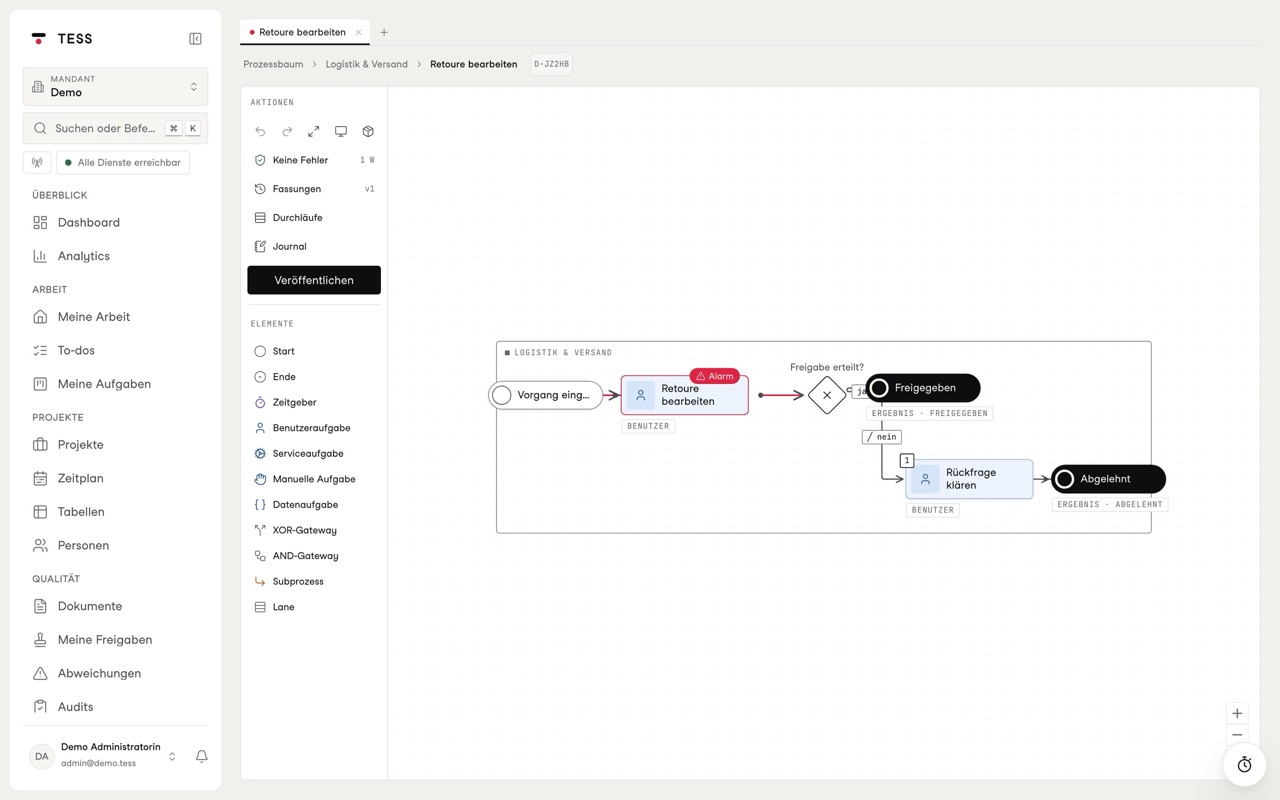
Diagram editor with checks, versions and an alarm on a step

Fifty processes at a glance. Two of them red.

The process orb shows every process of a tenant at once, grouped by department and connected through their handovers. The colour is the state. When a new alarm comes in, the orb turns towards it.

  • Process mapOne level of the tree as a freely arranged map, every group with the state of its content.
  • Links with data handoverWhich process hands what to which, checked on save.
  • Tags and searchCore process, Pilot 2027 or an ID such as D-4K2QX: search finds both.
Process orb of the demo tenant with every process, grouped by department

“A diagram is only worth something once the data shows that the process really runs that way. That is why any step in TESS can carry a rule.”

Simon BrüserArchitecture, Evolvet
More about Evolvet

What arrives is kept safe. Unalterable.

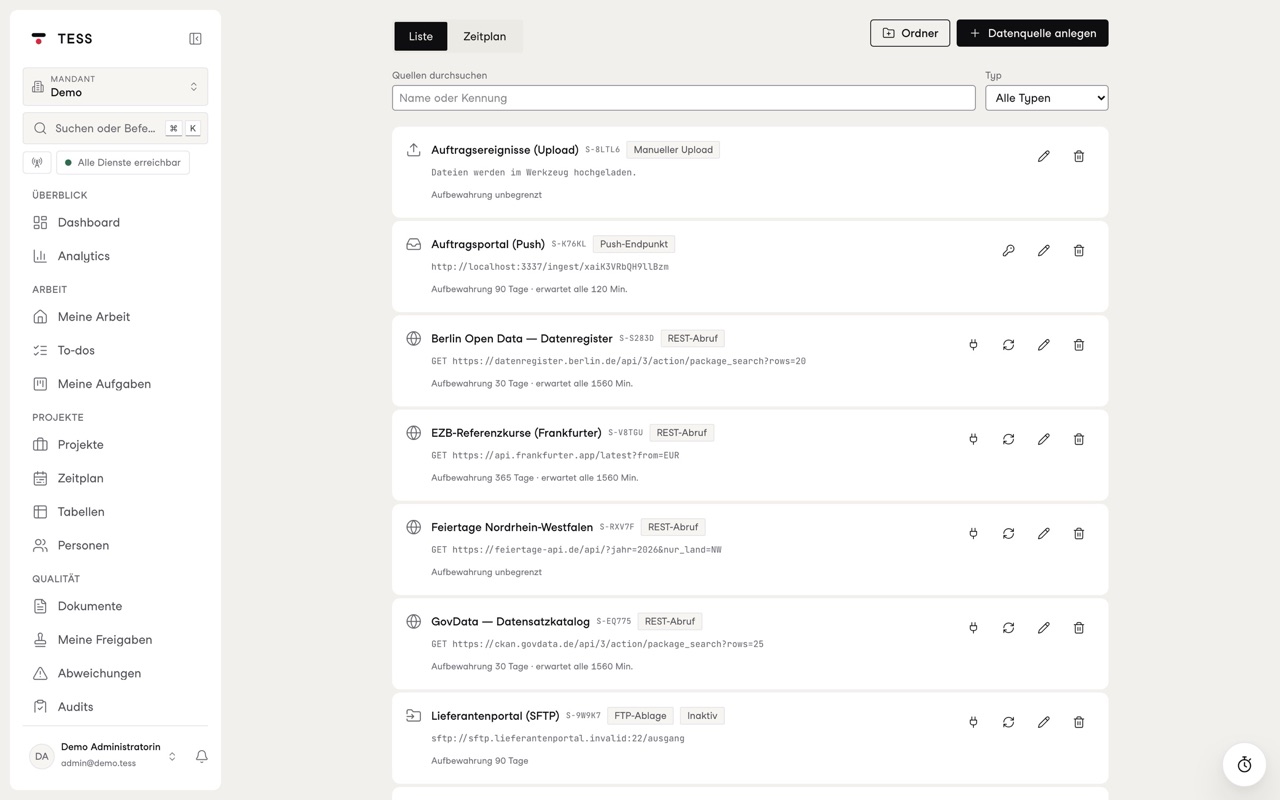
Your systems deliver via REST API, FTP or SFTP, through a dedicated push endpoint or as an upload. TESS stores every delivery unchanged, with a checksum, before it touches it, and knows how much data should arrive by when.

  • Provable byte for byteThe original can be downloaded at any time and held against its checksum.
  • Fetch scheduleWhen each source is fetched and what came of every appointment, by day, week, month and year.
  • Retention per sourceYou decide how long content stays. That a delivery arrived remains visible.
Data sources fetched via API, FTP, push and upload

A rule doesn't just say “wrong”. It says what would have been right.

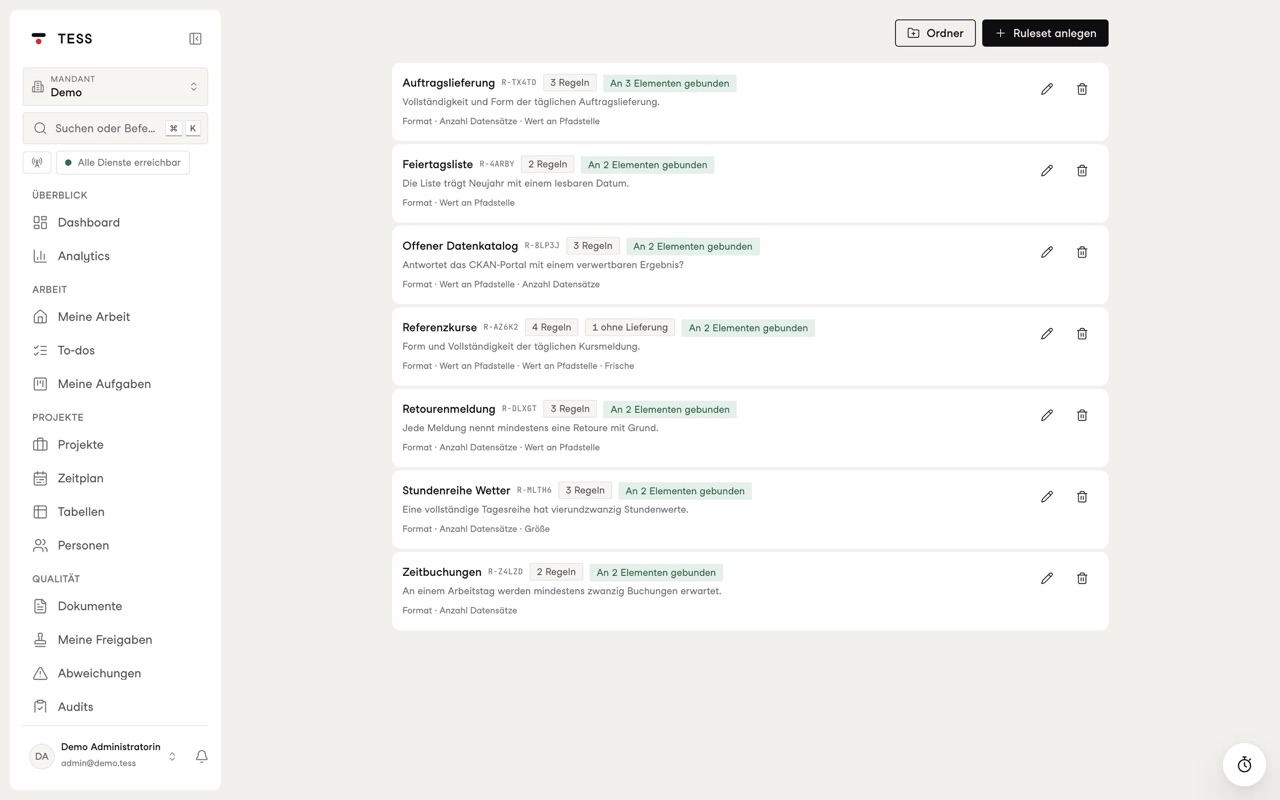
Every step in the diagram can be bound to a data source and a ruleset. If a delivery breaks a rule, the step pulses red within five seconds, in the diagram, in the tree, in the orb and on the dashboard.

  • Seven rule typesFormat, number of records, structure, value at a path, size, punctuality and deliveries per time window.
  • Expected and actualEvery finding names both values, the time and the delivery it concerns.
  • Test modeTry a rule against the latest deliveries without raising an alarm.
Rulesets with their rules and the elements they are attached to

The process runs. Even when nobody is watching.

TESS runs published processes on its own engine. Every instance leaves a history. Where it gets stuck, an incident appears that you can retry, correct or skip.

  • One delivery, many casesA start event can start one instance per record of a delivery. You can calculate the run as a dry run first.
  • Decisions with a safety netA gateway decides on a condition or lets a language model read the case. If it is unsure, TESS asks a person.
  • Tasks in the role's inboxWhoever takes a task completes it through a validated form, and whoever completes it is recorded in the history.

Service task

Calls your ERP, your CRM or a webhook, with an idempotency key so a retry creates nothing twice.

Gateway

Exclusive or parallel, with a condition or a semantic decision including its log.

Task

Lands in the role's inbox, with a due date and a form.

Timer

Waits three days or until Monday morning and then carries on by itself.

Data task

Reshapes data without running a script, from a closed catalogue of operations.

Subprocess

Calls another diagram and waits for its result.

Between the handbook and everyday work there are usually a few detours.

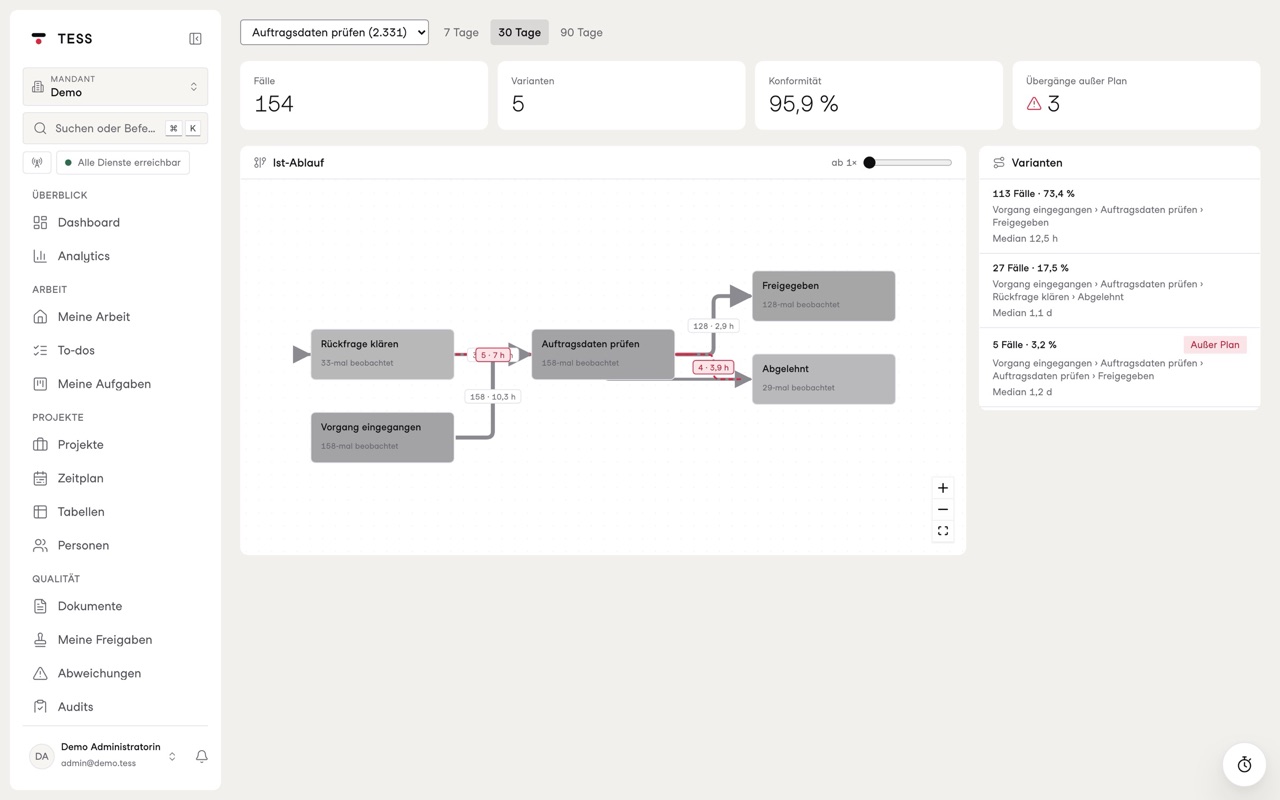
Process mining assembles the process as it is lived from the traces of your systems and the engine and places it next to the modelled process. The engine detects transitions that do not occur in the model and marks them.

  • Actual flow and variantsFrequency and duration of every transition, every variant with its cases and its lead time.
  • ConformanceHow often reality actually follows the model, weighted by frequency.
  • Events from any sourceA mapping of case, activity and timestamp is enough, even for logs from other systems.
Process mining with actual flow, variants and transitions outside the plan

A metric is a question. TESS writes it as a sentence.

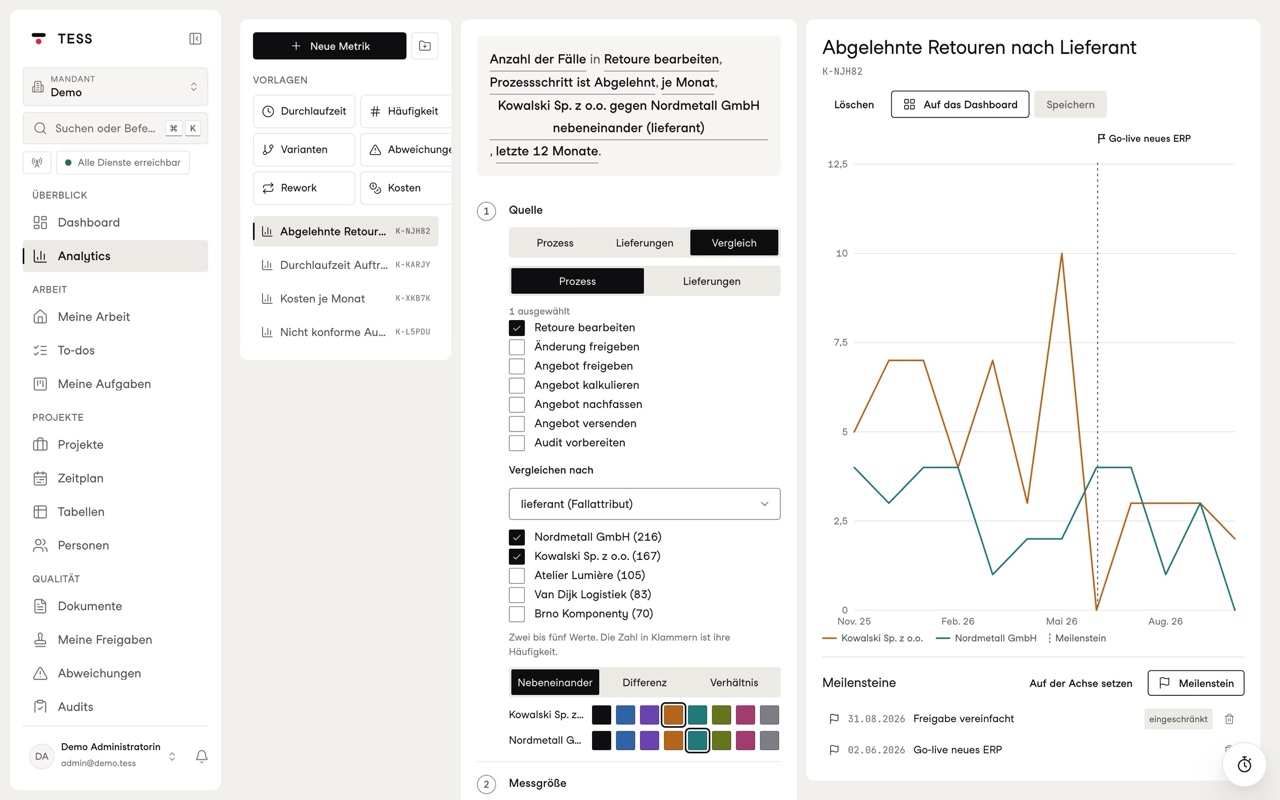
In analytics you build metrics from your cases and deliveries, such as rejected returns by supplier over the last twelve months. The editor reads your settings back to you as a sentence, so you see what you asked.

  • Six chart typesLine, bar, donut, table, list or KPI, with prior-year comparison and forecast.
  • MilestonesA go-live or a new rule appears on every matching curve.
  • A dashboard for everyoneOne shared grid per tenant that your team arranges itself.
Analytics: rejected returns by supplier compared, with milestones
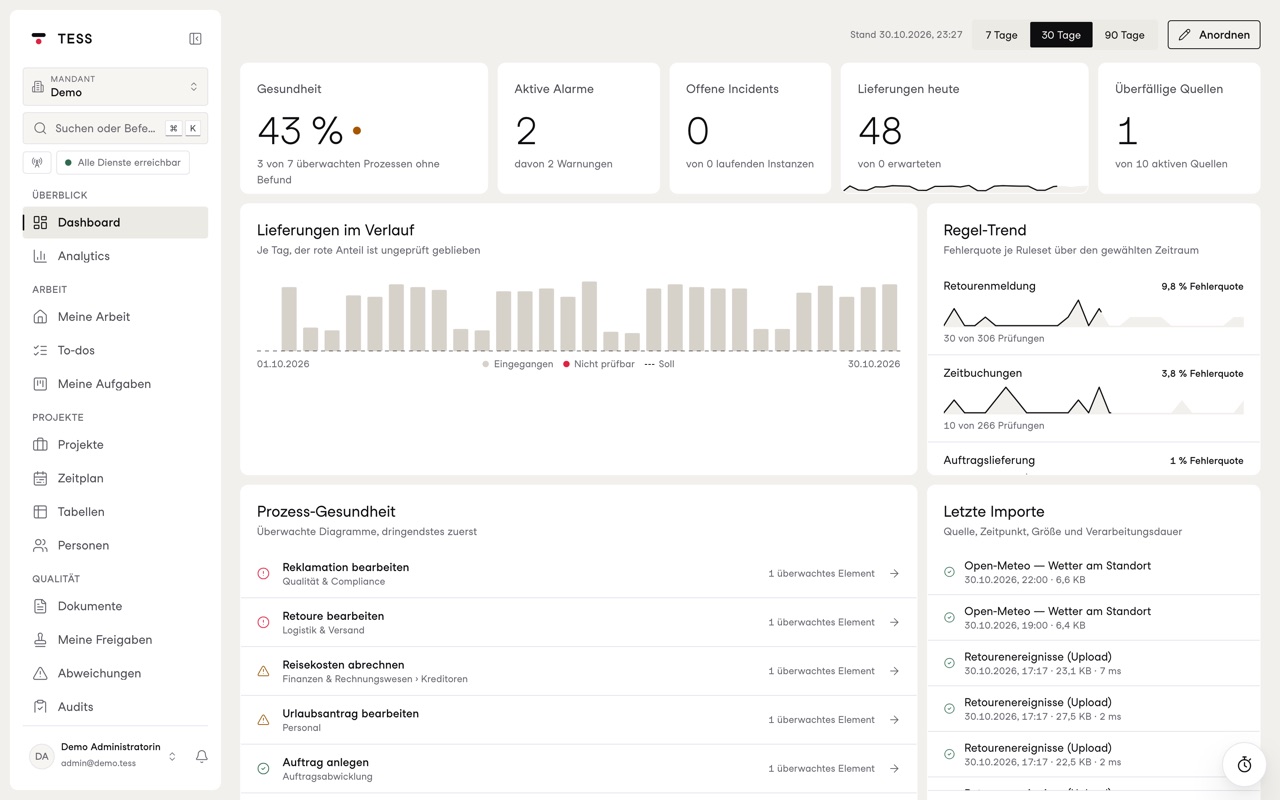
Dashboard with health, deliveries and rule trend

Telling is enough. TESS builds the diagram.

Describe a process in your own words or give TESS your documentation. The copilot creates a laid-out diagram from it, checks it against the same rules as any other and saves it as a draft.

  • Always a draftPublishing is reserved for you.
  • Provider of your choiceCloud AI to start with, a self-hosted model if you wish.
  • Without your deliveriesThe copilot sees the names of steps and roles, never the content of your data.
“When an order comes in, purchasing checks the quantity. From 500 units management approves it, otherwise it goes straight to the warehouse.”
Check quantity500 units or more?yesHead approvesnoTo warehouseDraft, not published

Show us a process. We'll tell you whether it's right.

In thirty minutes we model one of your processes in TESS and connect one of your data sources.

Book a demo